The Six-Inch Final Grade: A Phone-Delivery Audit for 10-Bit Editors
Photo: James Nash (aka Cirrus), CC BY-SA 2.0, via Wikimedia Commons
There is a moment in every indie delivery where the grade stops being yours. You export a file, upload it to a review link, and the client opens it on a phone that is brighter, punchier, and far less forgiving than your calibrated monitor. In 2026, that six-inch screen is the real final grade suite. If your workflow starts in 10-bit log and ends in an H.264 handoff, the phone is not just displaying your work. It is reinterpreting it.
This is not a argument against phone viewing. Clients watch on phones because that is where their audience lives. The problem is that many editors treat the H.264 review file like a neutral copy of the grade. It is not. It is a compressed, tone-mapped, platform-re-encoded translation, and the translation can introduce banding, skin-tone shifts, and shadow crush that were never in your timeline.
Why the handoff changes the image
A 10-bit graded file is an intermediate. It holds enough tonal steps to keep a sky gradient smooth and enough color information to keep a face from going plastic. An 8-bit H.264 delivery file has far fewer steps to work with. Add a phone's display processing, a platform's automatic re-encode, and a viewer's brightness setting, and the weakest parts of the image get exposed first.
The usual culprits are not exotic. They are the same three failures we see repeated across client review links: gradients that break into stripes, skin tones that drift warm or green, and shadows that collapse into a single muddy value. None of these require a bad grade. They only require a delivery file that was never checked on the device that matters.
What we tested, and what broke
For this audit, we took a short narrative scene graded in DaVinci Resolve from a 10-bit log source and exported several H.264 versions: a high-bitrate 1080p file, a standard 4K file, and a smaller review copy. We played them on an iPhone, a midrange Android phone, a laptop, and a living-room TV. We also uploaded the same files to Instagram Reels, TikTok, YouTube, and Vimeo to see what platform re-encoding did after the fact.
The pattern was consistent. The high-bitrate 1080p file held up best on phones. The 4K file looked sharper on a monitor but did not automatically survive phone tone mapping better. The smaller review copy was the first to show banding in a dusk sky and the first to turn a medium-brown skin tone slightly orange under the phone's default display profile. The platform uploads added their own compression on top, which made the shadows blockier and the gradients less stable.
The three failures you will see
Banding in skies and gradients
A smooth blue-to-orange sunset is a stress test for 8-bit delivery. On a calibrated monitor, the transition may look clean. On a phone, it can break into visible steps, especially after a platform re-encode. The fix is not always a higher bitrate. Sometimes it is a deliberately gentler grade, a touch of grain, or a delivery file that avoids the most fragile part of the gradient.
Skin tones that go plastic or green
Phones often apply their own contrast and saturation. A grade that relies on subtle separation between warm highlights and neutral midtones can lose that separation in H.264. Faces may look flatter, slightly green in the shadows, or too red in the highlights. This is where a quick skin-tone strip in your test render is worth more than another hour of color-wheel nudging.
Shadows that collapse into mud
Shadow crush is the most common client note because it is the easiest to see on a phone in a bright room. Details that sat at 5 to 10 IRE on your monitor can read as pure black after compression and tone mapping. If the story depends on a face in a dark doorway, check that face on a phone before you send the link.
Export settings that survive the trip
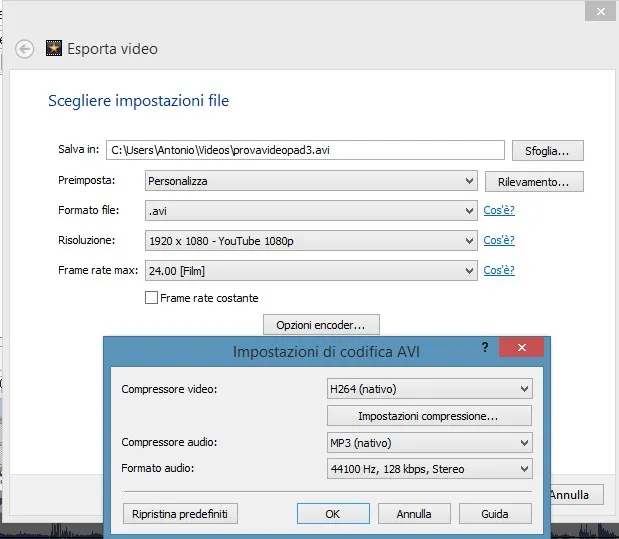
Do not send a 10-bit log master as your review file. Send a graded Rec.709 file in 8-bit H.264 with a high bitrate, and keep the 10-bit or ProRes master for archive and broadcast. For 1080p review files, aim for roughly 20 to 45 Mbps. For 4K review files, aim higher, but remember that bitrate alone will not fix a fragile gradient. Tag the file correctly as Rec.709 and avoid leaving HDR metadata on an SDR review copy.
A small amount of grain or dither can help gradients survive compression. It does not need to be a look. A subtle 1 to 3 percent grain pass can break up the banding that would otherwise appear in a clean sky. If the client needs a broadcast deliverable, make a separate master. One file should not serve the review link, the social team, and the broadcast reviewer.
The two-minute gradient test before delivery
Build a simple test clip that matches your project's color and contrast. Include a 10-step grayscale ramp, a slow shadow ramp from 0 to 15 IRE, a saturated sky gradient, and a skin-tone strip from light to deep. Export it with the exact settings you plan to use for the client. Then watch it on a phone, not on your grading monitor.
Look for three things: visible steps in the gradient, color shifts in the skin strip, and any shadow detail that disappears. If the test fails, change the export before you change the grade. Often a higher bitrate, a different resize, or a Rec.709 tag fixes more than a color tweak. If the platform upload still fails, consider a slightly softer contrast curve in the review version and keep the more aggressive grade for the master.
A delivery checklist for real clients
Before the link goes out, confirm the file is graded, not log. Confirm it is tagged Rec.709. Confirm the bitrate is appropriate for the resolution. Watch the first and last 30 seconds on a phone at default brightness. Check one dark scene and one skin-tone close-up. Then upload a short excerpt to the platform the client will actually use. If the client is a broadcast reviewer, send a separate compliant master and do not assume the H.264 review file will pass technical QC.
The phone is not the enemy. It is the last screen in the chain, and it deserves a test. A two-minute gradient check before delivery is cheaper than a reshoot, a re-grade, or a client note that says the sky looks striped. Your 10-bit grade can survive the handoff. It just needs a delivery plan that admits where it is going.