The $250 Data Safety Net: A Two-Drive Backup Workflow for Small Crews
The two-drive rule, explained
You do not need a DIT cart, a NAS, or a cloud subscription to keep a small shoot safe. You need two drives, a card reader, and a checklist you actually follow. The rule is simple: every camera card gets copied to two separate drives before anyone formats it. One drive goes to the editor. One drive stays with the producer or goes home with you. The card stays in the case until both copies are verified.
That is it. No RAID. No network. No drama.
The $250 kit
Here is a realistic US shopping list for 2026. Prices move, but this is the ballpark.
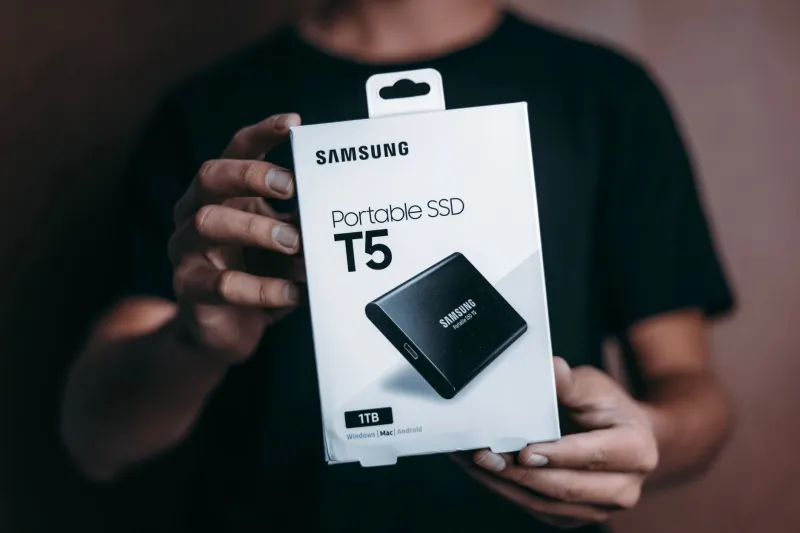
- Primary drive: a 1TB portable SSD like a Samsung T7 or SanDisk Extreme, about $90 to $120.
- Backup drive: a 2TB portable HDD like a WD My Passport or Seagate One Touch, about $60 to $80. If you are shooting a lot of 4K ProRes, bump to a 2TB SSD and a 4TB HDD and you are still around $300.
- Card reader: a good USB 3.2 reader for SD or CFexpress, about $25 to $40.
- Cables and a padded pouch: about $15.
- A roll of gaffer tape and a Sharpie: whatever is in your kit.
Total: roughly $200 to $250. That is less than a single day of a rental DIT in most US cities, and you own it.
Why two drives beat one RAID
A RAID 1 enclosure protects you if one drive dies. It does not protect you if someone knocks it off a table, if the enclosure itself fails, if the bag gets stolen, or if you accidentally delete a folder. Two independent drives can be kept in two places. That is the point.
The two-drive rule also gives you a handoff plan. Drive A travels to the editor. Drive B stays with the producer. If Drive A is lost in a car or dropped in a parking lot, you still have the shoot. If Drive B is at home and the edit bay floods, Drive A still has the files. Redundancy is not about being fancy. It is about separating risk.
The offload checklist
- Before the shoot, format both drives. Use exFAT if you need to hand off between Mac and Windows. Use APFS if everyone is on Mac and you want better performance. Name them SHOOT_A and SHOOT_B.
- Create a folder structure that makes sense: PROJECT_NAME / DAY_01 / CARD_A. Do this before the first card comes out of the camera.
- Never format a card in the camera until it has been copied to both drives and verified. Not one drive. Both.
- Use a card reader, not the camera. Cameras are slow and they put wear on the port.
- Copy the card to Drive A. Then copy it to Drive B. Do not use drag-and-drop if you can avoid it. On Windows, use robocopy. On Mac, use rsync. Free tools like TeraCopy or FastCopy are fine too.
- Verify. Check the file count and total size on both drives against the card. For checksums, use rsync -avc on Mac, or a free tool like ExactFile on Windows. If you use DaVinci Resolve, its Clone Tool can copy and verify checksums in one step.
- Only after both copies pass verification, format the card in the camera.
- Label both drives with the project name and date. Put Drive B in a different bag from Drive A.
Real-world speeds and failure points
A fast UHS-II SD card through a good reader to a T7 SSD can hit 150 to 250 MB/s. CFexpress Type B to an SSD can hit 600 to 800 MB/s. A portable HDD usually settles around 100 to 130 MB/s. That means your backup drive is the slow one. Plan for it. A 128GB card might take 10 to 15 minutes to copy to the SSD and 20 minutes to the HDD. Do not start an offload five minutes before wrap.
The common failure points are boring. A cheap reader overheats. A cable gets kicked. Someone unplugs a drive without ejecting it. A drive falls off a cart. exFAT gets corrupted after an unsafe removal. Use short cables, keep drives on a stable surface, and eject properly. Check drive health with CrystalDiskInfo on Windows or smartctl on Mac. If a drive starts making clicking noises, stop using it.
Handing off to the editor
Give the editor Drive A with a simple text file that lists the project, shoot date, card names, file count, and the checksum method you used. Keep Drive B with the producer until the project is delivered. Do not erase Drive B after the edit starts. Keep both drives for at least 30 days after delivery, or longer if the client is slow to pay or slow to approve.
The editor should copy the files to local storage or a larger working drive, but Drive A stays as the set backup. If the editor needs more space, that is a separate budget conversation. The two-drive rule is not a media management strategy for the whole post pipeline. It is a safety net for the handoff.
The bottom line
A $250 kit and a 20-minute checklist will not make you a DIT. It will make you the person who still has the footage when a card fails, a drive dies, or a bag goes missing. That is the whole job. The two-drive rule is cheap insurance, and it fits in a backpack.